Getting Started
Quickstart
Get Janus running in 5 minutes with Docker Compose.
Prerequisites
Docker and Docker Compose are required. Node.js 20+ is only needed for development from source.
One-click deploy
Deploy a full Janus instance without cloning the repo:

For AWS with Terraform, see AWS Deployment. For Docker Compose, see Docker Deployment.
Manual setup
# Download the compose file
curl -O https://raw.githubusercontent.com/elliot736/janus/main/docker-compose.yml

# Create environment file with generated secrets
cat > .env << 'EOF'
DB_PASSWORD=$(openssl rand -hex 32)
HMAC_SECRET=$(openssl rand -hex 32)
TOKEN_SECRET=$(openssl rand -hex 32)
COOKIE_SECRET=$(openssl rand -hex 32)
BETTER_AUTH_SECRET=$(openssl rand -hex 32)
CORS_ORIGIN=http://localhost:3000
REDIS_PASSWORD=$(openssl rand -hex 32)
EOF

# Start everything
docker compose up -d
This starts 5 containers: Nginx (port 80), API, Dashboard, PostgreSQL, and Redis.
git clone https://github.com/elliot736/janus.git
cd janus
npm install
cp .env.example .env
# Edit .env — fill each secret with: openssl rand -hex 32

# Start database and cache
docker compose -f docker-compose.yml -f docker-compose.dev.yml up postgres redis -d

# Set up schema
cd apps/api && npx drizzle-kit push && cd ../..

# Seed test data (3 sites, API keys, 7 days of verification history)
cd apps/api && npm run db:seed && cd ../..

# Run everything
npm run dev
Once running:
| Service | URL |
|---|---|
| Dashboard | http://localhost:3000 |
| API | http://localhost:3001 |
| API Docs | http://localhost:3001/docs |
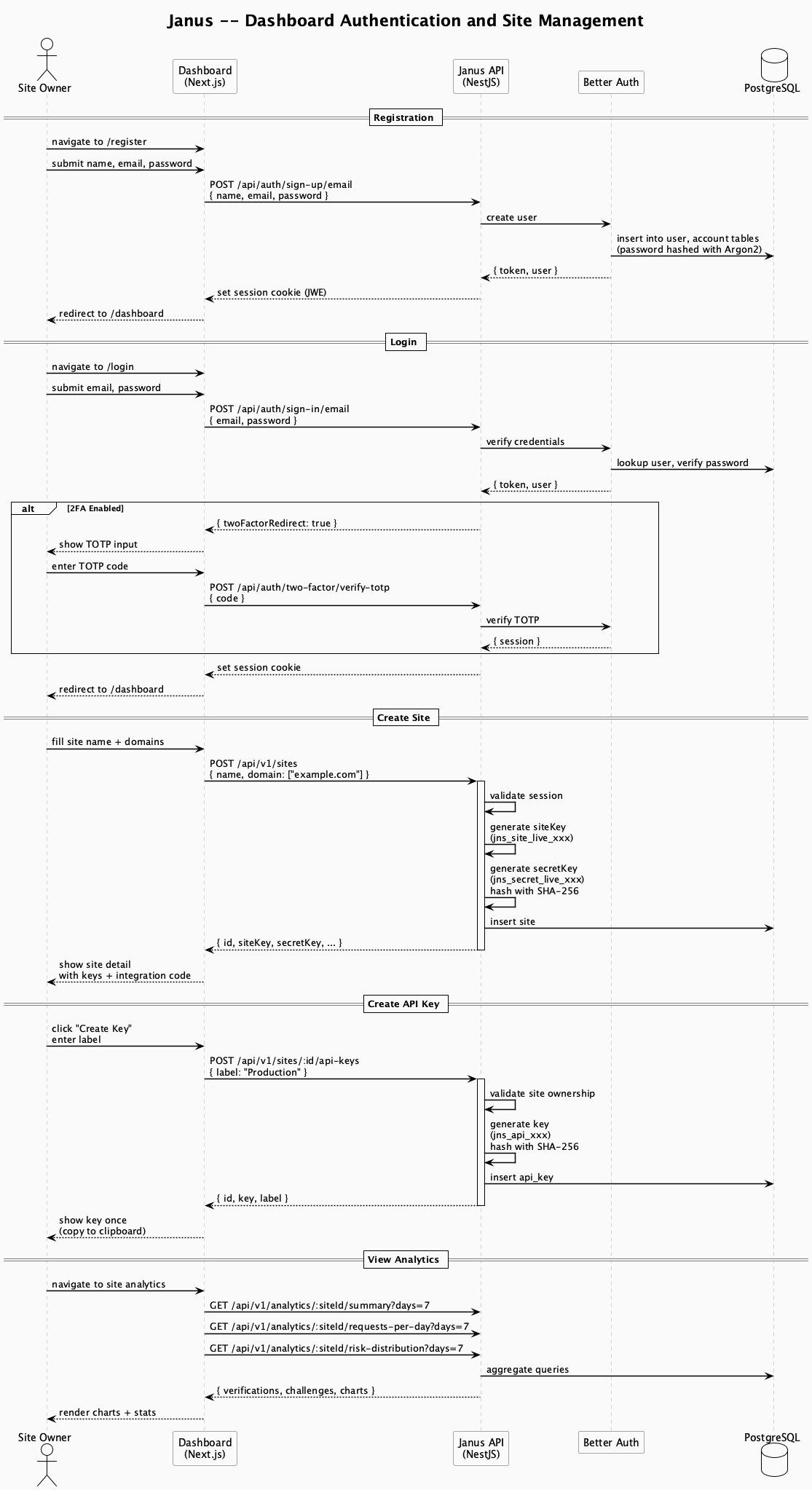
Dashboard flow
Next steps
Create a site
Sign in to the dashboard, go to Sites → Add Site, enter a name and domain. Save your site key and secret key.
Add the SDK
Choose your framework and install the integration package.
Validate tokens
Your backend calls /api/v1/siteverify with the token from the client. Done.